

Get started
Switching from Google or Outlook to Proton: how a small business moves email, calendar and files
Proton has long been the obvious answer to privacy-friendly email, but getting there used to be a hobby project of IMAP imports and DNS fiddling. In June 2026 Proton launched Easy Switch for Business, a guided migration for organisations. The move is still not fully automatic. This guide follows the whole journey from Google Workspace or Microsoft 365 and marks the pitfalls that remain.
The reasons to leave Google or Microsoft usually come down to three: you do not want the company’s email under US legislation (the CLOUD Act guide explains why that matters even when the server sits in Europe), you do not want to pay to remove ads and AI features you never asked for, or a customer or procurement process has started demanding where your data lives. Proton stores everything in Switzerland, encrypted so that not even Proton can read your mail, and is ISO 27001 certified and SOC 2 audited.
Full disclosure before we start: the Proton links in this guide are advertisement links via /ut/, and we may receive a commission if you become a customer. Proton has held a score of 5 and the “Best privacy” badge in our catalogue since before the partnership existed, and this guide writes as much about what is bad as what is good.
The situation in 2026: email is solved, files are not
Until recently, switching to Proton was above all a question of patience: IMAP import, manual domain configuration and a period of uncertainty about whether everything actually came along. That changed in June 2026 when Proton launched Easy Switch for Business: a guided six-step migration that moves mail, calendar and contacts from Google Workspace while you run in parallel without downtime. IT Security Guru summed it up as Proton removing the last barrier to leaving Google Workspace.
But read that sentence once more: mail, calendar and contacts. Proton themselves state that Drive migration is “not available yet, but planned”, and an equivalent path from Microsoft 365 is due during 2026. If you are coming from Outlook/Microsoft today, expect more manual work, and wherever you come from, the file move is the guide’s biggest hands-on effort.
Before you start: a one-hour inventory
One hour of inventory saves a weekend of irritation. Go through:
- The folder structure in your email. Proton supports a maximum of three folder levels; deeper structures are flattened on import. More than 2,000 folders or folder names longer than 100 characters require cleanup first.
- Shared calendars and booking systems. This is the most common real dealbreaker. If you rely on shared calendars with customers, Calendly, Teams or a CRM that syncs the calendar: read the calendar section before you decide.
- Accounts that sign in with Google or Microsoft. “Sign in with Google” disappears when the account does. List which services use it. There is a way to keep the function at the end of the guide.
- Services that send mail on your behalf. Web shop, CRM, newsletter tool, the printer in the copy room. They need to be reconfigured against Proton’s SMTP submission.
- DNS. Lower the TTL to 300 seconds on the domain’s records a few days before the switch, so the changeover propagates faster when the time comes.
Choose a plan
Proton charges per user, with a 14-day free trial and no card required. Approximate prices with annual billing, July 2026:
| Plan | Price per user/month | Suits |
|---|---|---|
| Mail Essentials | ~7 USD | Encrypted email and calendar on your own domain only |
| Workspace Standard | ~13 USD (EUR in the EU) | The full suite: mail, calendar, 1 TB Drive, Pass, VPN |
| Workspace Premium | ~25 USD | More storage and administrative features |
For comparison, Google Workspace Starter sits around 7 USD and Microsoft 365 Business Basic around 6 USD per user. So Proton is not cheaper if you only count the email, but the Standard plan includes a VPN and password manager that Google and Microsoft sell separately or not at all. Start a 14-day free trial of Proton Workspace if you want to test the flow before deciding. If email alone is enough, Proton Mail for Business is available separately.
Step 1: The domain, in the right order
A custom domain requires a paid plan and is done in Proton’s admin panel. The order matters, and Proton itself warns against doing it backwards:
- Create the organisation and verify the domain with a TXT record (
protonmail-verification=...). - Create all users and addresses before touching MX. Every employee needs their address, plus any role addresses like support@ and info@. Miss this and point MX first, and mail can be lost in the gap.
- Point the MX records to Proton.
- Add SPF (
include:_spf.protonmail.ch), the three DKIM CNAME records and DMARC. Without them, outgoing mail risks landing in recipients’ spam. - Consider catch-all during the transition, so you catch mail to addresses you forgot to create.
DNS can take up to 48 hours to propagate, hence the parallel running below. Small business owners who have made the journey report that the domain guide itself takes under half an hour; it is the waiting that takes the time.
Step 2: Move the email with Easy Switch
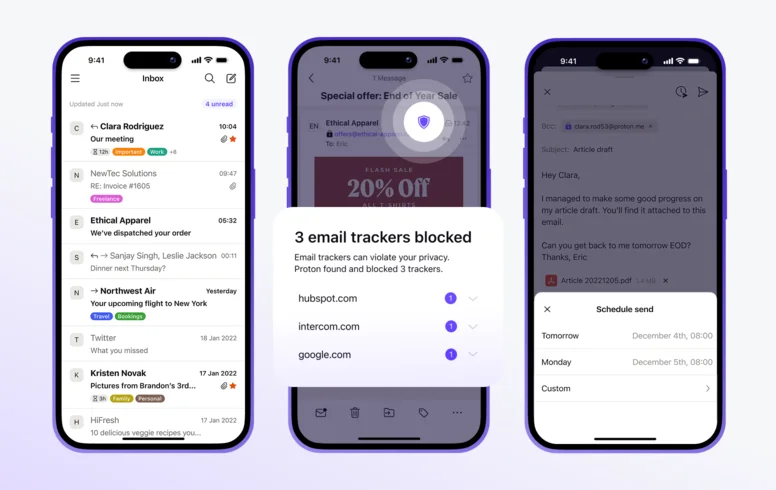
From Google Workspace, the administrator runs Easy Switch for Business: a guided migration that moves mail, calendar and contacts per user and keeps parallel delivery going while it works. From Microsoft 365 or an IMAP service you use Easy Switch at account level until the Microsoft path lands.
Three traps to know about:
- Large mailboxes take time. The import runs in the background and can take days for old, large accounts. Start it on a Friday and let it work over the weekend.
- The 80 percent trap. For Gmail imports, Easy Switch by default fetches the most recent mail up to roughly 80 percent of available storage. The rest you have to fetch with “more import options” afterwards. It is the most common cause of “not everything came along”.
- IMAP sources require preparation. Yahoo and some others require app passwords, and IMAP must be enabled at the source. Outlook via OAuth can require admin approval for organisational accounts.
When the import is done: set up forwarding from the old address, or keep Proton’s Gmail connection, which both fetches new mail and lets you reply from the Gmail address inside Proton.
Step 3: The calendar, with open eyes
The calendar is imported as .ics, via Easy Switch or manual export from Google or Outlook. It works, but the calendar is Proton’s weakest card and you should know the limitations before the switch, not after:
- No CalDAV. External calendar clients and systems cannot sync against Proton Calendar. Booking systems like Calendly cannot read your availability.
- Existing meeting invitations do not stay live. Recurring meetings that customers or partners invited you to do not carry over as invitations. They become static events. Expect to ask for new invitations for recurring meetings driven by someone else.
- Shared calendars are rebuilt manually inside Proton, and external calendar subscriptions are read-only.
- As a stopgap, the Android app can subscribe to your old Google calendar with a four-hour sync interval, which is enough during the transition.
If the calendar is business-critical, as it is for a consultancy booked via link, this is the section that decides whether switching is reasonable at all.
Step 4: The contacts
Export the contacts as vCard or CSV from Google or Outlook and import them into Proton. Check custom fields and notes on a couple of contacts afterwards; field mapping between systems is not always one-to-one. This is the guide’s smallest step.
Step 5: The files to Drive, by hand

There is no automatic migration from Google Drive or OneDrive. What exists is Google Takeout, Proton Drive’s desktop app for Windows and macOS, and your own structuring:
- Export with Google Takeout, or simply download shared drives and document folders directly.
- Convert the Google formats. .gdoc, .gsheet and .gslides are not files but pointers, and must be exported as .docx, .xlsx and .pptx respectively. Proton Docs can currently only open .docx, so expect to run spreadsheets and presentations as finished Office files for now.
- Upload via the desktop app in Proton Drive with drag and drop. Each user has 1 TB in Workspace Standard, and version history going back up to ten years, which doubles as your ransomware protection.
- Rebuild the sharing. All old sharing links die. Go through which folders are shared with whom, and recreate them with Proton’s password- and expiry-protected links. It is tedious, but it is also a chance to clean out sharing that was too wide anyway.
Using Photos? Google Takeout puts the images’ metadata in separate JSON files, and dates can end up wrong on import. Elis Hirwing describes the problem in his migration blog, with a script fix for those affected.
Step 6: Everything around it
- Services that send mail (web shop, CRM, printers) are reconnected with Proton’s SMTP submission: token-based login against smtp.protonmail.ch, port 587. Requires a paid plan with a custom domain. Mail sent that way is not end-to-end encrypted.
- “Sign in with Google” can be kept without paying Google: create a free Cloud Identity account that stays with Google after the cancellation. It is Elis Hirwing’s smartest trick, and it also keeps Play Store and other Google dependencies.
- Desktop clients. Proton Mail Bridge lets you read Proton in Outlook, Apple Mail or Thunderbird if someone on the team refuses the web interface.
Step 7: The passwords to Pass
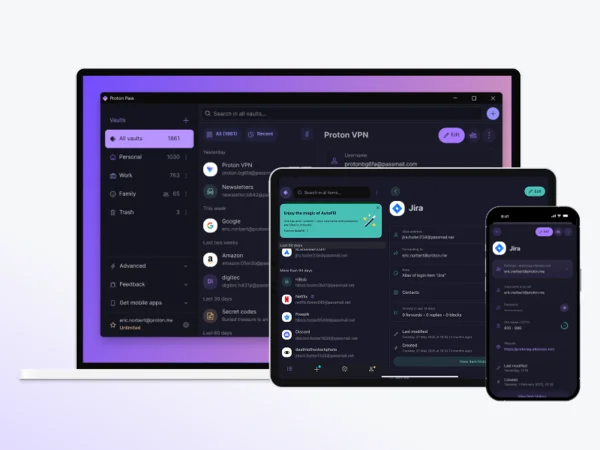
Proton Pass is included in the Workspace plans and worth rolling out at the same time: central vaults for shared company accounts, enforced two-factor policy, Dark Web Monitoring that warns the admin about leaks, and fast on- and offboarding when staff come and go. Import existing passwords via export from the browser or the old password manager.
Step 8: Wind down, in the right order
Run in parallel for two to four weeks. Verify that the import is complete, that the calendar is being used for real and that no external services still post via the old account. Last of all, cancel the old subscription.
There is an unpleasant surprise to avoid here: Elis Hirwing reports that Google locked the account immediately upon cancellation, despite prepayment. So make sure everything is exported and verified before you press the button, not after.
One more thing, and it matters for the administrator: Proton’s encryption means that the admin cannot restore or read an employee’s mailbox. Set a recovery phrase and backup address for every user on day one. At an offboarding without that, the contents can be inaccessible for good.
Where Proton still limps
An honest guide does not end with fanfare. These are the compromises:
- The integrations. End-to-end encryption and third-party integrations are in practice incompatible. An IT security consultant who ran Proton for a year and a half left on the grounds that the calendar will never sync with Teams, CRM and the rest of the stack. If your everyday life is built on such syncs: stay.
- The search. The server can only search subject lines and metadata. That is the price of it being unable to read the content. Full-text search builds a local encrypted index per device and browser, which takes time and requires storage space in large mailboxes.
- The calendar, as above.
- No team chat. Slack or equivalent has to be arranged separately.
- Mobile and offline. The apps are good but offline support is weaker than Gmail and Outlook, and mobile document editing lags Google’s equivalents.
- Switzerland is outside the EU. The country has an adequacy decision from the European Commission and strong privacy legislation, but it is not EU sovereignty in the strict sense. Our sovereignty report sorts the concepts.
Does the switch suit you?
Yes, probably: consultancies, law firms, accounting and healthcare companies handling sensitive customer data, small teams where email is the hub and files are mostly documents, and everyone who has already decided on grounds of principle or requirements.
Wait or look closely first: companies with heavy calendar automation towards customers, organisations that live in Teams, and teams where several people edit the same spreadsheet in real time every day.
Checklist
- Inventory folders, shared calendars, logins and SMTP senders.
- Lower DNS TTL to 300 a few days ahead.
- Create the organisation, verify the domain, create all addresses before MX is repointed.
- Run Easy Switch for mail, calendar and contacts, ideally over a weekend.
- Convert Google documents and move the files manually to Drive, rebuild the sharing.
- Reconnect SMTP senders and create Cloud Identity for “Sign in with Google”.
- Set a recovery phrase and backup address for every user.
- Run in parallel for two to four weeks, verify, cancel the old one last.
Sources
- Proton – Easy Switch (support)
- Proton – Switch from Gmail to Proton (support)
- Proton – Easy Switch for Business launch (blog, June 2026)
- Proton – Custom domain: verification, MX, SPF, DKIM (support)
- Proton – SMTP submission for services (support)
- Proton – How search works in encrypted mail (support)
- Elis Hirwing – My experience of migrating from Google G-Suite to ProtonMail (Swedish blog, 2026)
- Dev Problems – Proton Workspace for Business Review (2026)
- IT Security Guru – Proton removes the last barrier to leaving Google Workspace (2026-06-17)
- Valydex – Proton Business pricing compared with Google and Microsoft (2026)
Tools mentioned

Proton Mail
Proton
Encrypted email from Proton AG in Geneva, built for privacy and a popular European alternative to Gmail and Outlook. Data is processed by default in Switzerland under Swiss law, with a GDPR representative in the EU. There is a permanent free plan, and the paid plans come with a 14-day free trial.
- Strong encryption and privacy focus under Swiss jurisdiction.
- Data is processed by default in Switzerland, which has an EU adequacy decision.
- Switzerland is outside the EU, even though the country has an adequacy decision.
Best for: A business that wants to move its email away from the American giants without leaving Europe, for example a consultancy handling sensitive client data.

Proton Pass
Proton AG
Password manager from Swiss Proton with zero-knowledge encryption, built-in email aliases and a very low entry price – with storage in Switzerland, which admittedly provides strong privacy protection but not EU sovereignty in the strict sense.
- Swiss privacy legislation and zero-knowledge encryption
- ISO 27001 certified and SOC 2 Type II audited
- Data storage in Switzerland (not EU/EEA) and no selectable EU region
Best for: Privacy-focused small businesses that already use or want to enter the Proton ecosystem

Proton Drive
Proton AG
Encrypted cloud storage from Swiss Proton: files are encrypted on your device before upload, so not even Proton can read them. An alternative to Google Drive and Dropbox for businesses that take confidentiality seriously. 14-day free trial on business plans.
- End-to-end encryption: files are locked on your device before upload, no third party can read them
- 14-day free trial on all business plans, 1 TB per user
- Data is stored in Switzerland – outside the EU/EEA, but the country holds an EU adequacy decision
Best for: Businesses handling sensitive documents – contracts, financials, client material – that don't want their cloud provider to be able to read them.

Proton VPN
Proton AG
VPN from Swiss Proton with open source, no-logs policy and a free plan with no data cap. An alternative for businesses that want to protect network traffic outside the American tech giants.
- Swiss privacy legislation and no-activity-logs policy
- Free plan with no data cap or artificial speed limit
- Servers and storage in Switzerland, i.e. outside the EU/EEA (but with an adequacy decision)
Best for: Businesses that want a privacy-focused VPN from the same provider as Proton Mail.
Related articles
This is general information, not legal advice. See How we review.